


In this article, we’ll be taking a deep dive into Akeneo connectors, and looking specifically at the official Akeneo connector for Salesforce B2C Commerce Cloud (SFCC).
Catalog connectors are rarely plug and play. Using the SFCC connector requires a thorough analysis of attributes and product structures in both systems, configuration, testing and often some custom development for those cases that are special to you. In the way of these exercises, you may make improvements to your catalog (or fix it!) along the way, so you might have to tweak your storefront product and category pages too.
Fortunately, Akeneo recognised this and made its connector for SFCC both highly configurable and extensible through custom programming in SFCC. At Interactiv4, we have specialized teams for both Akeneo and SFCC with years of experience, ready to support you with these tasks.
With that said, let’s continue!
We have already talked about the advantages of having a PIM for an organization, about all the work that marketing and product departments, etc., save. The importance of the fact that the product has the best information, since it is decisive in capturing the customer’s attention and making the best decisions when choosing the purchase, in addition to increasing the customer retention ratio, The more and better information you have, the better the user experience will be.
You analyze the products, identify the attributes, create the families, define the models, the categorization, beginning to create or migrate the products and enrich them… You have an immaculate PIM! Now what? PIM is such a waste if the information you manage in it is not used. Obviously you have set it up because you have in mind to take advantage of all its features; the way to do this is by interconnecting it with other systems that enrich or consume product information.
The definition of a connector is: “Part of a system that serves to connect, that is, establish a union, a link, a communication with others.” In this specific area, a connector helps us send and/or receive information from the PIM. Akeneo App Store already has a lot of connectors, both its own and those of authorized collaborators, developed for both CE and EE editions, some of them are:
Akeneo PIM has evolved a lot, those of us who have been working with it for years have noticed great advances and technical improvements, some of them have to do with Akeneo’s business strategy as a company.
Early connectors were based on point-to-point file transfers. Since its inception, Akeneo has always had the functionality of export profiles, so the first connectors were based on the use of them, basically following the following guidelines:
This way of doing it had several disadvantages, especially in terms of synchronization times, file availability and response times. If any of the parts of the gear failed, it was difficult to handle the error, and the access points were often not compatible between systems, there was no standard.
During the first versions of Akeneo EE, the company distributed the source code, so many clients chose to hire software developers to implement complex and robust solutions. We already know what happens when there is no standard, everyone does what they can, many developers do not even follow good coding practices, and even if they do, everyone develops as they think will be convenient.
Of course, this situation added costs, sometimes astronomical, to the development and maintenance of the PIM; many times connectivity problems were not even resolved efficiently. There were cases in which a significant impact was even seen on the performance of the Akeneo server.
Since version 3, Akeneo made its own RESTFUL API available to clients, this marked a before and after for PIM clients. Akeneo recommends the use of the API to successfully achieve PIM connection in the IT environment and states that it is the best way to connect with third-party systems. The reasons given are the following:
There is no doubt that the speed of the API has reported very good performance, especially after the turn of the screw that Akeneo has made from v3 to v4, reducing response times by almost half. The use of RESTFUL is already a standard, which constitutes a great advance in the issue of interoperability and universality of solutions, by having a system dedicated to answering calls through this standard practically any external system, which has the credentials of access, you can connect to the PIM.
Starting from the idea that the Akeneo code cannot be touched, the PIM becomes a passive element, the consumption and exploitation of the information is delegated to the target system, which now becomes a consumer client of the RESTFUL services. . That is why official connectors or apps have to be implemented in the recipient; sometimes there is a middleware that is responsible for making the bridge between the PIM and the rest of the systems.
With the development of the Web API, Akeneo has been directing clients and their developers towards a model in which the source code (EE version) cannot be touched, developments have to be done externally, there is a security control robust, and in some way the developments must follow good practices and standards in implementation.
Akeneo calls them “Apps” and has extensive documentation that helps developers, the themes it develops are:
I will not go deeper into this point since it is not the topic of the article, but it is interesting from a technical point of view. I will leave the link here in case you want to immerse yourself in the interesting world of Akeneo Apps.
One of the e-commerce platforms that is currently most successful, and with increasing demand for implementation, is Salesforce B2C Commerce Cloud (from now to the rest of this document SFCC). Of course, it is a great candidate to be part of a complete ecosystem, which also includes a PIM to match, so if we enter into the “Akeneo app Store” and put the word “salesforce” in the search box, we will result in “Akeneo Connector for Salesforce Commerce Cloud”.
On the page we can see that it has been developed by Akeneo, it is available only for the EE edition in PaaS and SaaS mode, starting from version 6. The current version is 22.2.2. Allows customers to send the PIM catalog to Salesforce Business Manager. The connector works by converting Akeneo API data to Salesforce XML format.
This connector claims to be the easiest way to spread the catalog at SFCC. Of course, it takes advantage of the latest API technology to provide an integration between Akeneo and SFCC.
The integration allows the customer to configure predefined jobs in Salesforce Commerce Business Manager to retrieve product data, products with variants, categories, attributes, media, assets, associations and price lists from Akeneo PIM.
Imports can be done manually or automatically through CRON jobs as part of the native Jobs feature of Salesforce Commerce Cloud.
A set of custom preferences also allows the customer to map Akeneo PIM attributes to the existing Salesforce Commerce taxonomy.
Like most modern platforms, SFCC offers third-party extensions and integrations through plugins called “cartridges.” A cartridge is a container for packaging and deploying program code and data. The official Akeneo documentation explains in detail the steps to install the connector cartridge.
In general it is difficult to measure performance; several criteria that affect it must be taken into account. Akeneo mentions 4 main criteria:
So to improve performance Akeneo recommends the following:
There are two ways to import product information:
Incremental import. Depending on the last successful import date, the system can sync only new products when necessary. However, to rebuild some data on the SFCC side, some tasks must be run as a full import anyway (for example, categories are imported completely even in an incremental import). However, this incremental import process reduces the necessary import time. This type of import is used daily to resynchronize data that has changed.
Once the catalog architecture is complete in Akeneo PIM and the collections are ready to export, product content can be broadcast to SFCC from the SFCC Business Manager, just follow a few simple steps to install the app, configure the preferences and use the scheduled jobs functionality that will call API endpoints to retrieve the entire catalog within SFCC.
The connector is a one-way system: it exports PIM data to SFCC. No SFCC data is sent to the PIM.
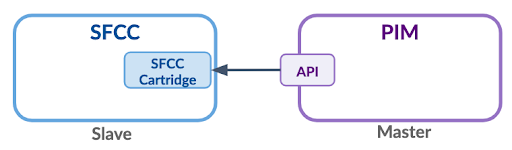
The connector is made up of 12 jobs:
As I mentioned before, each job can be executed manually or automatically. You can find the complete explanation of each job in the Akeneo process overview documentation.
The data that the connector is capable of importing from Akeneo is the following:
A long explanation is gathered here.
The use of connectors is today an essential task in establishing robust ecosystems. Currently, there has been enormous progress in methodologies and technology to achieve the best connectors.
Speaking of the Akeneo SFCC connector, it is an agnostic connector and independent of a specific customer’s specifications. The goal is to provide a solid technical foundation to interconnect systems. If some particularities are required, it is necessary to have a professional development team at SFCC. At Interactiv4 we have the best team to analyze and develop solutions according to the specific needs of any integration.
It is important to consider that Akeneo connectors are third-party plugins, so you will be affected by the limitations of SFCC, which is designed to handle a massive volume of data, but with as little transformation as possible. The first rule to keep in mind, said by Akeneo, is to “think independently”, that is, if you have to choose between many data models in the PIM, you should always opt for a native SFCC approach. That is, if in SFCC a data is managed as an integer, the attribute will have to be created as an integer type in Akeneo, instead of delegating this task to the connector. The connector will do the job, but performance will decrease.