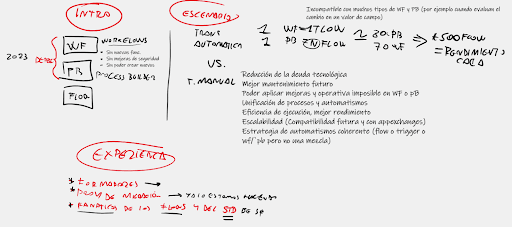


To understand what’s happening with Process Builder and Flow, we have to go back a few years to when Salesforce, with the goal of automating tasks and making our lives easier, created Workflows and later improved them with Process Builder. In our 2018 blog post, we told you all about it.
As you already know, Process Builder is a Salesforce tool that allows you to create a series of automatic actions that are executed when a determined action occurs.
Right now, history is repeating itself. After identifying certain problems and not meeting user expectations, the American CRM company has decided to substitute Flow for Process Builder.
Does this mean that Process Builder is going to disappear? Well, no. The tool will remain active, but after 2023, no new functions will be introduced; you won’t be able to create new automations nor security improvements. Therefore, speaking practically, it will be as if it were deactivated.
So the countdown begins: all companies that have their Workflow and Process Builder automations must switch them to Flow before 2023.
Flow is very similar to Process Builder but better in practically every area, given that it offers much more interesting settings and options. We can sum it up like this: it’s an application that allows you to automate complex processes and favor declarative programming (without coding). This means that we’re multiplying the development speed by eight with this tool when compared to traditional development methods like Lightning Web Components and Apex. It also helps Salesforce administrators complete tasks more efficiently, in less time, and with more precision.
With Flow, we can create multiple workflows easily and substitute what was being done in Workflow or Process Builder, no matter how complex. Therefore, we’re not far from the moment in which Flow will be the only tool used by Salesforce administrators to automate all processes.
To update the automatic actions and transition towards the Flow model, there are two options:
There are Salesforce tools that allow you to automatically migrate to Flow. However, this option presents a few problems:
Therefore, we believe the automatic migration tool isn’t ideal for the 2023 deadline we face with the migration from Workflow and Process Builder.
Manually transitioning to Flow offers interesting advantages:
In addition, when the manual migration is done, we can ensure that we’ve created a coherent automation strategy that’s focused on just one platform. It’s important to focus on it given that, if we’re using various solutions, we could find some incompatibility; this can lead to problems in the future.
If you’re not sure how to do it or where to start your transition to Flow, Leadclic can help you. Here’s three reasons why: